New Feature: Add Feedback to Your Cloze Tests
We just shipped a feature many teachers asked for: exercise-level feedback.
You can now add one feedback message for the whole cloze exercise, and students will see it at the right moment:
- after clicking Show Answers
- or when no attempts are left (if “Display the correct answers after no more attempts are left” is checked)
This makes it easy to explain grammar choices, strategy, common mistakes, or model reasoning after students finish.
What Is New
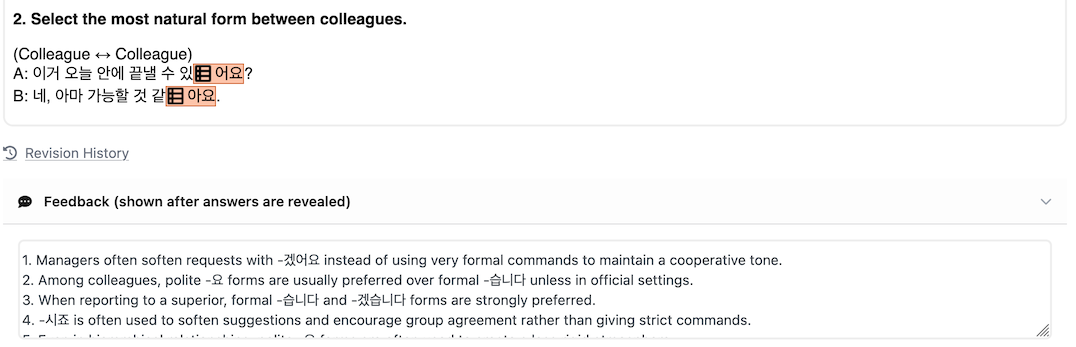
1. Global Feedback Field in the Test Editor
When creating or editing a test, you can now add an optional feedback message for the entire exercise.
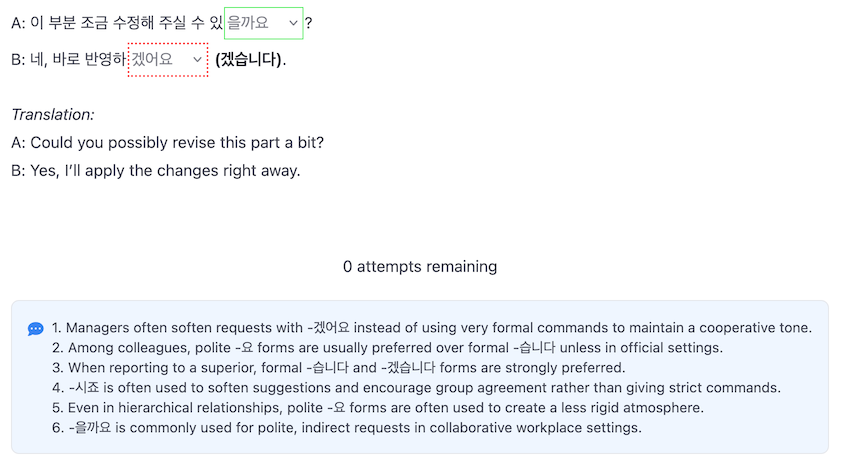
2. Student View Integration
The feedback block appears only when answers are revealed:
- when a learner clicks Show Answers
- or when attempts are exhausted and answers are shown automatically
(be sure to check “Display the correct answers after no more attempts are left”)
3. Moodle XML Import Support
If your XML contains question-level <generalfeedback>, Clozetesting imports it into the exercise feedback field.
If multiple feedback tags are present across questions, they are merged and labeled by question number during import.
4. PDF Support
Feedback now appears in PDF outputs when answers are included:
- Solutions PDF from the test PDF export
- Results PDF when "Show answers" is checked
How to Use It
- Open your test in the editor.
- Add your explanation in the Feedback field.
- Configure attempts and Show Answers as needed.
- Save and publish.
That is it - students now receive the explanation at the end of the exercise, exactly when it is most useful.
Posted by Clozetesting